Deployment
Deployment Guide (AWS, single instance, Ubuntu 18.04 LTS)
Keywords & Official Docs
- SSH Private Key
- AWS EC2
- AWS CodeDepoly
- AWS IAM
- Docker Engine
- Docker Compose
- Github Actions
- Github Actions Secrets
What to Do on the EC2 Instance
The ec2 instance should be at least 2 CPUs and 4~8 GB RAM.
GraphDB requires a lot of RAM, i.e. typically 3GB.
SSH to the ec2 instance using private key aws provided.
ssh -i .\path-to-the-key.pem ubuntu@12.34.56.789Install
docker, for more details, see the official guidesudo apt updatesudo apt-get install \apt-transport-https \ca-certificates \curl \gnupg-agent \software-properties-commoncurl -fsSL https://download.docker.com/linux/ubuntu/gpg | sudo apt-key add -sudo add-apt-repository \"deb [arch=amd64] https://download.docker.com/linux/ubuntu \$(lsb_release -cs) \stable"sudo apt-get updatesudo apt-get install docker-ce docker-ce-cli containerd.ioInstall
docker-compose, for more details, see the official guide# To install a different version of Compose, substitute 1.27.2 with the version of Compose you want to use.sudo curl -L "https://github.com/docker/compose/releases/download/1.27.2/docker-compose-$(uname -s)-$(uname -m)" -o /usr/local/bin/docker-composesudo chmod +x /usr/local/bin/docker-composeInstall
CodeDeploy Agent, for more details, see the official guidesudo apt-get updatesudo apt-get install ruby wgetcd /home/ubuntu# https://docs.aws.amazon.com/codedeploy/latest/userguide/resource-kit.html#resource-kit-bucket-names# For us-east-2 region only, if you are in other region replace us-east-2 with the region name.wget https://aws-codedeploy-us-east-2.s3.us-east-2.amazonaws.com/latest/installchmod +x ./installsudo ./install autoSet up swap file
sudo fallocate -l 4G /swapfilesudo chmod 600 /swapfilesudo mkswap /swapfilesudo swapon /swapfilesudo echo '/swapfile swap swap defaults 0 0' | sudo tee -a /etc/fstab
What to Do on the AWS Console (Webpage)
Login
Set up Secrets on the Github Repository
To create secrets for a user account repository, you must be the repository owner
See the official documentation
You will need an IAM account that has
Access key IDandSecret access key. The IAM user should have the access toCodeDeploy.Set
AWS_ACCESS_KEY_IDto yourAccess key ID.
Example: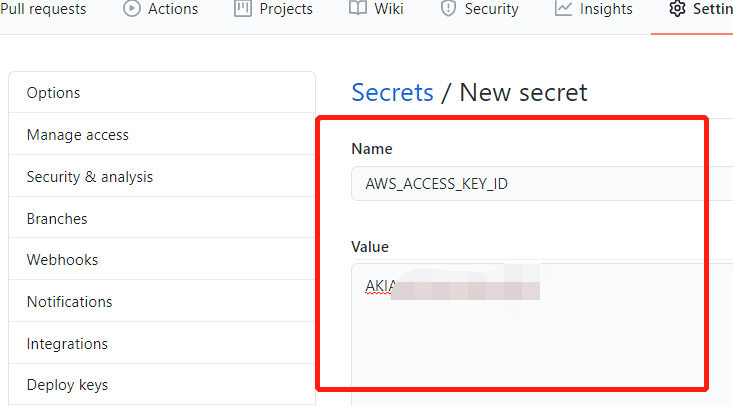
Set
AWS_SECRET_ACCESS_KEYto yourSecret access key